Secure chat systems
Optimizing back channel interjections into other people’s meetings
2015-02-15 — 2026-01-27
Wherein Signal Is Recommended for Practical Use, Its Phone‑number Registration Is Noted, Push Notifications Are Mentioned as a Potential Leak, and Face‑to‑face Conversation in a Faraday Cage Is Advised.

tl;dr Everyone use Signal for now I guess, or better yet just meet up face-to-face. In a Faraday cage.
1 Confidentiality in chat apps
The Electronic Frontier Foundation reviews good encryption options, and comparitech has one focused on chat apps specifically.
The ephemeral nature of chats may make them easier to practically secure than email, at least if we do it right.
That said, there are notoriously too many chat programs that aspire to security and not enough people who want to use the secure ones. Further no-one uses the same chat protocols. Building them is hard and many are doing it badly. The ones that exist are often awful — gossip has it that the stalwart pidgin/adium/libpurple was bad in that it is full of security bugs. Even without that, the underlying protocol (XMPP) by design leaks information about our contact list to the server. A more modern approach is Off-The-Record chat, which is available in some systems, (e.g. Signal) but implemented with varying degrees of laxity.
Skype was particularly egregious. it was an NSA honeypot, and not even an especially usable one.
There are attempts below to do confidentiality right, but consider also the problem of jurisdiction. Trumping end to end encryption shows one way secure confidential communication is being white-anted. Indeed, this has been partly outsourced to my own nation, Australia, via the Ass Access Bill.
Chat apps dies of course; see e.g. Cryptocat (2011 - 2019) (formerly listed here).
2 UX
I should think about that. Chat with glue explores UIs in chat-based interfaces.
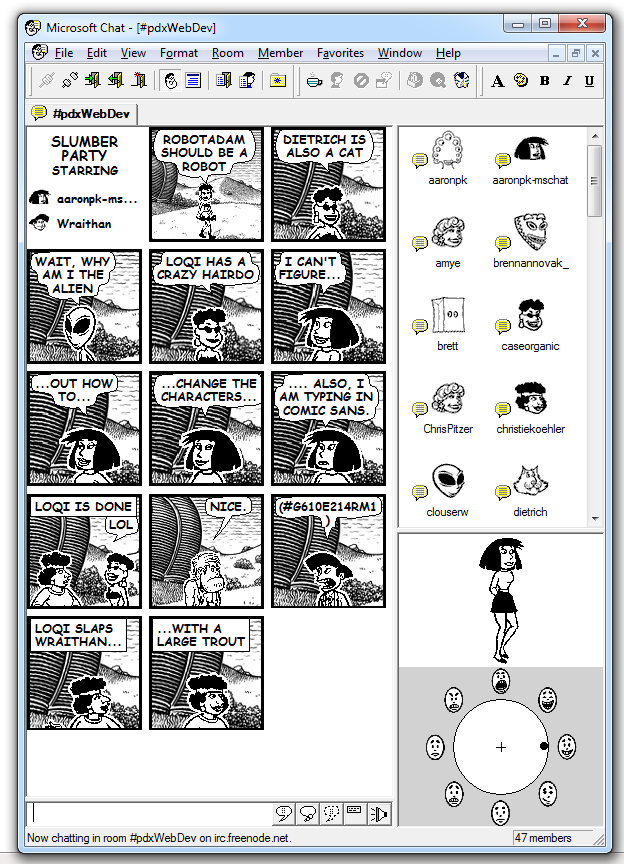
Robert Fabricant mentions a defunct product, comic chat.
3 Does Apple push notification destroy encrypted messenger privacy?
I’m no expert, but it sounds like push notifications may be implemented in a mostly secure way, provided we trust the device at all.
4 Services
4.1 Signal
Free, worldwide, encrypted voice calls for iPhone and Android from Open Whisper Systems, who are big names in the field. Doesn’t disclose message content, in principle. Doesn’t disclose users’ contact lists, if we’re to believe them.
Signal uses your existing number, doesn’t require a password, and leverages privacy-preserving contact discovery to immediately display which of your contacts are reachable with Signal. Under the hood, it uses ZRTP, a well-tested protocol for secure voice communication.
Signal was designed specifically for mobile devices, using a jitter buffer tuned to the characteristics of mobile networks, and using push notifications to preserve battery life while still remaining responsive. Signal is also Free and Open Source Software, allowing anyone to audit the code for correctness or help contribute improvements. The project even pays out a percentage of donated Bitcoin for every merged pull request.
It seems good that it’s semi-open, friendly, and widely used.
The Signal OTR algorithm is apparently used in iMessage and WhatsApp, but how can we tell in these secretive, closed-source apps?
WhatsApp, at least, breaks the protocol’s security in the name of convenience, and uploads our contacts to suspect third parties.
I’m recommending Signal not because it’s perfect, but because it’s widely used and OK-ish. Signal’s governance could be better, but most alternatives are worse. In particular, it is hard to imagine how to switch from Signal when it eventually succumbs to government pressure to backdoor. Has that already happened? The pressure they are under must be enough to form diamonds.
For some of the governance controversies, see jwz and Stephen Diehl on Signal’s foray into cryptocurrency. FWIW, I think that cryptocurrency seems reasonably aligned with the values of privacy-focused chat and worth trying, at least. That is more than I could say about many of the cryptocurrency uses I see pitched.
4.2 Exporting
One problem is that it’s hard to archive chat history. Exporting from Signal Desktop is tricky. carderne/signal-export seems to do it OK, although macos is not officially supported.
NB: this method reveals that messages are not really convincingly encrypted on the desktop app, in the sense that anyone who is able to read local files can read the messages. Could have deduced that from the lack of password, I suppose? In any case, be careful. Does your computer have full-disk encryption enabled? Is it spook-proof?
4.3 Session
Session is a Signal-like alternative, backed by anonymization incentivized by a cryptocurrency called $OXEN. Unlike Signal, it does not require a phone number to register.
4.4 Telegram
Mobile: Telegram is popular in Germany, but has possibly questionable security. It’s probably better than nothing, or useful if we have lots of German friends.

4.5 Matrix
Matrix is a messaging layer for the internet, at a lower level than a chat solution per se. Specifically, it aims to
[provide] an open universal communication layer perfect for VR calling, messaging and collaboration, powering immersive experiences for conferencing, tourism, entertainment, telepresence, e-learning, etc. […] Matrix is that missing signalling layer for WebRTC. If you are building VoIP into your app, or want to expose your existing VoIP app to a wider audience, building on Matrix’s SDKs and bridges should be a no-brainer.
End-to-end encryption is available but optional. The recent security breach is, among other things, a lesson in why we shouldn’t trust server-side encryption—everything that relied on server-side encryption was compromised despite the operators’ care in maintaining the servers, while end-to-end encrypted messages appear to have been safe.
- Element is the flagship group-oriented chat system for Matrix. It looks a little like Slack.
- tchat is a French government-backed (?) fork (?)… an installation, or maybe something in between.
- Mozilla uses Matrix to power its internal discussions
If we want to run our own infrastructure to make this work, we need to run a server. The current reference server is called synapse. There’s a server rewrite called dentrite that claims to be less hacky, more scalable, and less tested. There are Docker versions.
So, how much server space should we provision?
The homeserver stores all clients’ personal chat history and user account information - much as a mail client connects through to an IMAP/SMTP server. Just like email, you can either run your own Matrix homeserver and control and own your own communications and history or use one hosted by someone else (e.g. matrix.org) - there is no single point of control or mandatory service provider in Matrix, unlike WhatsApp, Facebook, Hangouts, etc.
So if we’re hosting some geeky users, this will get quite large, storage-wise.
4.6 Wire
Like Signal, but with a better jurisdiction?
A free, personal account gives everyone the benefits of a secure, privacy-focused messaging app. Personal accounts can connect and communicate with Pro accounts.
- Messages, calls, photos and files — end-to-end encrypted
- Beautiful apps for mobile, desktop and web
- No phone number required to register
- No ads, no profiling, no user data sold to anyone
- Swiss jurisdiction, servers in Germany and Ireland
4.7 Jami
Desktop and mobile. Jami — I think it used to be GNU Ring.
The application uses distributed hash tables (DHT) to establish communications. This technology eliminates the use of centralised registers (servers) and the retention of personal data. Jami is based on a distributed network technology, eliminating the need for servers. Mass surveillance cannot be undertaken by the servers as there is not any.
Jami stores your secrets (private keys for encryption and identity) only on the device which executes it, which belongs to you. Your device is therefore the sole holder of your information.
Jami offers a digital identity with accounts that do not require anyone exposing their personal identity. All of the communications are encrypted with no exception with the most advanced current techniques. As free software, Jami is underpinned by an essential objective: to be a distributed communication system that respects the privacy of its users, thanks to its design without infrastructures or centralised servers.
4.8 Meta-chat: Matterbridge
Matterbridge is a product spun off from Mattermost chat, providing a
bridge between mattermost, IRC, gitter, xmpp, slack, discord, telegram, rocket.chat, steam, twitch, ssh-chat, zulip, whatsapp, keybase, matrix and more with REST API (mattermost not required!)
Looks neat. I don’t cover the Mattermost product that spawned this matterbridge thingy, since Mattermost has poor security and using this bridge likely introduces unfortunate infosec weaknesses. But it’s so handy! So shiny! It even allows, for example, bridging Facebook Messenger to a real app. The WhatsApp basic example illustrates what’s going on here.
4.9 Bridgefy chat
It’s the flagship app of the Bridgefy mesh network, which I know little about except that it doesn’t require the internet.
4.10 Mumble
Mumble is a free, open source, low latency, high quality voice chat application.
Mumble is primarily intended for gamers, and was the first to establish true low latency voice communication over a decade ago, but finds good use in many different environments as well.
We heard from users who record podcasts with our multi-channel audio recorder, players seeking realism with our positional audio in games, Eve Online players with huge communities of over 100 simultaneous voice participants (I bet they make good use of our extensive permission system 😄), the competitive Team Fortress 2 community making us their required voice communication platform, hobby radio transmission users, and a variety of workplaces adapting Mumble to fit their needs — be it on-head mobile devices or communicating across countries or into airplanes.
Administrators appreciate Mumble for being able to own their and their users’ data. Some make use of the extensive permission system for complex scenarios (for example separating two groups but leaders being able to talk to both). Some love to provide their users with additional functionality with scripts making use of server APIs, or host music bots and the like that connect to the server. Those that have an existing user database often make use of authenticators to allow authenticating with existing account login data.
4.11 Coyim
coyim — a privacy-focused instant messenger.
CoyIM is a new chat client that is safe and secure by default: no settings to change, no plugins to install, no computer configuration to change.
Not yet audited. Do not use for anything sensitive… CoyIM is a standalone chat client that focuses on safety and security. It is a self-contained program that runs on Windows, Linux and macOS. CoyIM only supports one chat protocol — XMPP (sometimes known as Jabber). CoyIM has carefully picked and chosen the features that are necessary to create a good chat experience, while keeping the attack surface of the system to a minimum.
It also has built-in support for Tor, OTR and TLS. The Tor support allows users to become anonymous while chatting, OTR makes end-to-end encryption of communication possible, and TLS adds another layer of encryption for the communication with chat servers. These features are not plugins or extras in any way.
CoyIM is implemented in Go. Many other implementation languages open up the door for a large number of attacks; we try to minimise those risks by using Go.
It doesn’t leak message content, but as far as I can tell, it does leak your contact list.
We can probably stop reading here; that should be enough chat clients to keep anyone busy and too many for fragmentation of our chat communities. From here on, the suggestions get successively more esoteric and/or untested.
4.13 Chatsecure
iOS: Chatsecure
ChatSecure is a free and open source messaging app that features OMEMO encryption and OTR encryption over XMPP. You can connect to your existing Google accounts or create new accounts on public XMPP servers (including via Tor), or even connect to your own server for extra security.
Unlike other apps that keep you stuck in their walled garden, ChatSecure is fully interoperable with other clients that support OMEMO or OTR and XMPP, such as Conversations (Android), CoyIM (Desktop), and more.
See the suggestive (but old) security audit
4.14 Jitsi
Desktop: Jitsi is an open-source skype-ish client. Unique feature: multi-person videoconferencing.
4.15 Keet
Keet by Holepunch is a decnet option.
Keet only shares end-to-end encrypted data between participants in your calls. Without middlemen, third-parties, or servers, there’s nobody left who can snoop or leak data.
4.16 Dissent
Group communications are nice to have if we have more than one friend. Dissent is an open-source project that tries to provide that and has solid academic credentials. There are no released products yet, though, and I suspect this project is dead.
Dissent’s technical approach differs in two fundamental ways from the traditional relay-based approaches used by systems such as Tor:
Dissent builds on dining cryptographers and verifiable shuffle algorithms to offer provable anonymity guarantees, even in the face of traffic analysis attacks, of the kinds likely to be feasible for authoritarian governments and their state-controlled ISPs…
Dissent seeks to offer accountable anonymity, giving users strong guarantees of anonymity while also protecting online groups or forums from anonymous abuse such as spam, Sybil attacks, and sockpuppetry. Unlike other systems, Dissent can guarantee that each user of an online forum gets exactly one bandwidth share, one vote, or one pseudonym, which other users can block in the event of misbehaviour
Dissent offers an anonymous communication substrate intended primarily for applications built on a broadcast communication model: for example, bulletin boards, wikis, auctions, or voting. Users of an online group obtain cryptographic guarantees of sender and receiver anonymity, message integrity, disruption resistance, proportionality, and location hiding.
4.17 Ostel
OStel is a public testbed of the Open Secure Telephony Network (OSTN) project, an effort with the goal of promoting the use of free, open protocols, standards and software, to power end-to-end secure voice communications on mobile devices, as well as with desktop computers. Both are concepts from The Guardian Project.
4.18 Pidgin/Adium etc
Pidgin/Adium/libpurple works, for what it’s worth, but is probably insecure because of bugs, deprecated, and leaks metadata (citation required). It doesn’t disclose message content if we choose the right settings, but it does leak, for example, the identities of who we are contacting. If we’re using this, we probably want to use coyim instead.
4.19 Skype if you must
Skype, as we have already mentioned, is honeypot spyware that reads your passwords. But we have some colleagues who are determined to use it, right? We could run it in a docker jail, but it’s probably simpler to use the web client.
4.20 Graveyard
This page has listed many apps over the years, many of which are now defunct.
- keybase is not technically dead, but nor is it healthy. It’s a key directory/ID provider as well as chat, i.e. it connects us with our social profiles, e.g. Twitter or GitHub or our website or whatever: here is my Keybase id: keybase.io/danmackinlay. However, it has fallen into disrepair since being bought by Zoom.
- Mozilla Hello
- Wickr
- Tox
- bitmessage
- COI/Chat-over-IMAP
5 Group chat
Do we want a social media site but for a single group? Or for a single project?